My cart

MiniFinder’s proprietary systems use smart technology and real-time features to enhance safety, security, and control in everyday life.
Our Categories
Selected Products
MiniFinder’s proprietary systems use smart technology and real-time features to enhance safety, security, and control in everyday life.
Our Categories
Selected Products

A GPS watch helps your child reach you when they need to, but what happens when the watch itself goes missing? After a day of school, play and activities, remembering where they took it off isn’t always easy. Fortunately, the location shown in MiniFinder Live and its Bluetooth search function can help you find it again.
To see how these features help, it’s worth looking at everyday life with the watch. When your child wants to walk to a friend’s house on their own or play a little further from home, a GPS watch for kids can make staying in touch easier. It gives them a way to reach an adult without having their own mobile phone, while allowing you to be there for them even from a distance.
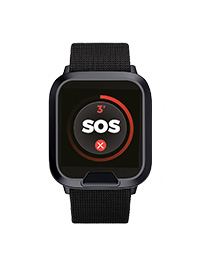
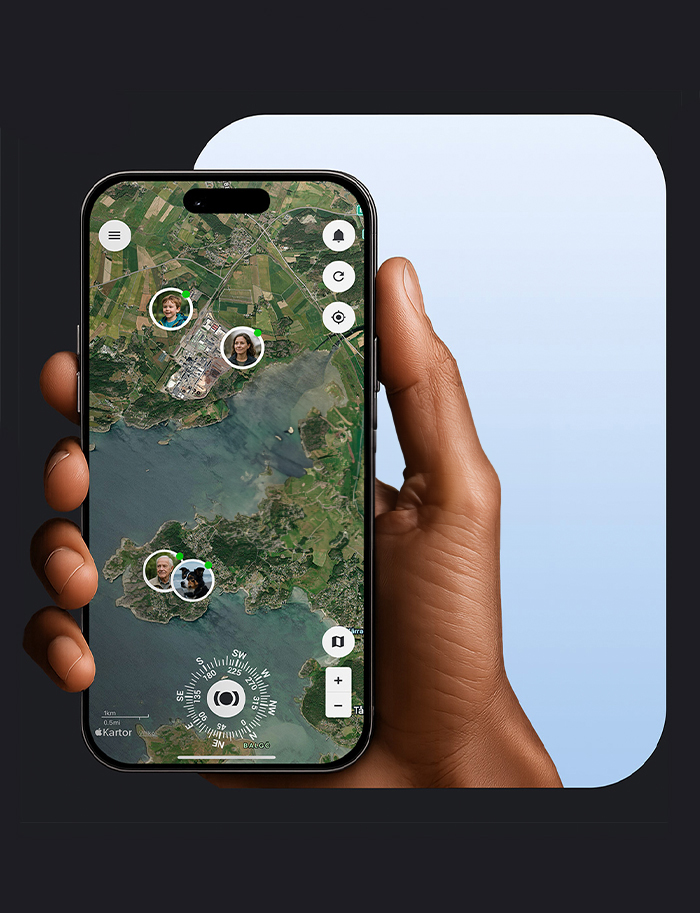
A children’s GPS watch lets you stay in touch and see your child’s location without them needing their own mobile phone. If a sports session finishes early, they can call to ask for a lift. If you can’t find each other, you can check the watch’s location in MiniFinder Live. Virtual boundaries, known as geofences, let you receive automatic notifications when your child arrives at school, comes home or enters an area you’ve agreed they should avoid. The SOS button lets them raise an alert when they need help, while a low battery warning reminds you to charge the watch before it runs out.
As a parent or guardian, you set the emergency contacts in MiniFinder Live and decide who has access to the watch. Anyone who wants to call or send messages to it needs access through the app. This keeps communication within a circle of people you control, protecting your child from unwanted contact. When choosing a children’s watch, it’s therefore worth checking both the features and how access is managed. Check the subscription, network coverage and battery life too, and choose a watch your child can wear comfortably and use on their own.
The first time your child walks to school alone, the journey can feel longer for you than it does for them. You’ve practised together, but you still want to know they’ve arrived safely. With geofences and smart alerts in MiniFinder Live, you can receive an automatic notification when they reach school or get home again. You can also be notified if they enter an area you’ve agreed they should avoid. This offers reassurance throughout the day without having to keep checking the map.
When a friend asks them to come round after school, checking with you is straightforward. With MiniFinder Kids Watch, your child can call you directly from the watch to ask, and you can ring when it’s time to come home. If they’re unsure of the way or want you to collect them, you can talk while checking the watch’s location in the app and help them find their way. Your child gets to practise doing more on their own, while you can still reach each other when needed.
If your child loses sight of a friend at the playground or takes a wrong turn on the way home, they may struggle to explain where they are, especially if they’re upset. They can use the SOS button on MiniFinder Kids Watch to alert the adults you’ve chosen as contacts. The alert includes the watch’s location, so you can see where your child is without them needing to know an address or describe their surroundings. That makes it easier to help them find their way or go and meet them.
Practising the watch’s functions together at home gives your child time to learn in a calm, familiar setting. Try calling each other, then go through how to use the SOS button and what happens when they raise an alert. Show them what the alert looks like on your phone in MiniFinder Live and how the watch appears on the map. Explain when and why you use this information, so they understand what you can see and how it helps you support them. Talk about what they should do while waiting for help or if you don’t answer straight away. Having practised together can make raising an alert feel less daunting when they really need help.
A GPS watch can quickly become part of your child’s daily routine, but like any belonging, it can sometimes be misplaced. MiniFinder Live can help you narrow down the search. Start by checking the last reported location and when it was updated to get an idea of where to look.
If the watch is nearby, you can use Bluetooth search in MiniFinder Live to help find it. Turn on Bluetooth on your phone and open the search function in the app. As you move around, an indicator shows whether you’re getting closer to or further away from the watch. This helps you work out whether to look by the sofa, in a school bag or among coats and jackets. The watch must be switched on and have battery power for the search to work. Walls and other obstacles can affect the signal, so move slowly and watch how the indicator changes.
Learn more about our children’s watch and find a solution that suits your child and your family’s routine.
Find answers to common questions about children’s GPS watches and how they can help your family feel more secure day to day.
A GPS watch may be useful when your child starts walking short distances alone, visiting friends without you or making their own way to an activity. They might need to call if they take a wrong turn, want collecting or need help. As a parent, you may want to reach them if plans change or check their location if you can’t find each other.
There is no single age that suits every child. Think about your family’s routine and whether your child needs a way to stay in touch without having their own mobile phone. They also need to be able to use the watch’s calling and SOS functions. Practise together and talk about when and why you might need to check their location.
Using a GPS device to help keep your child safe can be lawful, but the rules depend on the country and how the device is used. Children also have a right to privacy, so explain what you can see, why you use location sharing and when you might check it. Limit access to trusted adults and review these arrangements as your child grows older and becomes more independent.
You can, but if your main priorities are staying in touch and checking your child’s location, it’s worth looking first at a GPS watch designed specifically for children. Apple Watch offers a wide range of apps, activity features and notifications, which may give a younger child more to manage than they need.
MiniFinder Kids Watch focuses on safety and straightforward communication through calls, location sharing, an SOS button and geofences. It offers an option for families who want to give their child more independence while staying in touch, without them needing their own mobile phone.
The watch may find it harder to work out its exact location indoors because roofs and walls can interfere with the signals. This means the map may sometimes show it a little way from where it actually is. MiniFinder Live also uses Wi-Fi and Bluetooth to improve location accuracy, although small differences can still occur. Check when the location was last updated too, so you know how recent the information is.


Visit our contact page.